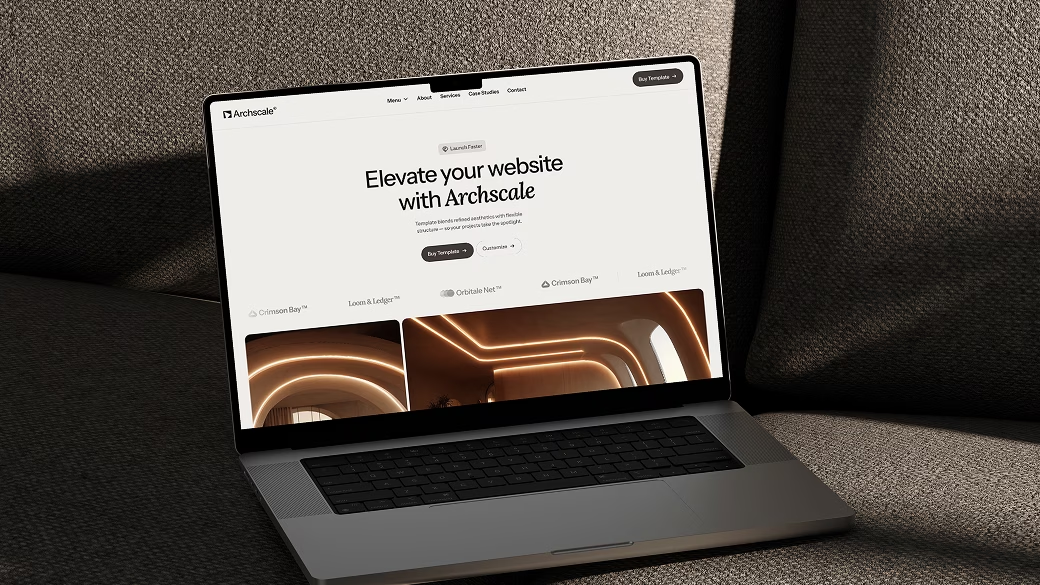



If you've been meaning to redesign your studio's site (or you're launching one from scratch), you've probably already typed something likebest Webflow template for architects into Google. So let's talk about what you actually need — and why Archscale was built for exactly this.
Before a client ever emails you, they've already judged you. They've seen your portfolio, read your about page, and decided whether you're worth reaching out to — all in about 90 seconds. That's the reality of running a design or architecture practice today.
A great website doesn't just show your work. It communicates your standard. When someone lands on a slow, outdated, or cluttered site, they don't think "oh, they're probably just busy." They move on to the next firm in the search results.
Your website doesn't need to be flashy. It needs to feel like you — precise, considered, and built to last.
Before we get into Archscale specifically, let's talk about the ingredients. A great architecture website in 2026 needs a few things that most generic templates completely miss:
These aren't luxury features. They're table stakes. And yet, the vast majority of architecture firms are operating without them.
Google gives a ranking boost to sites that load in under 2.5 seconds. Archscale is built lean — no bloated plugins, no unnecessary scripts. It's optimized out of the box so you don't have to think about it.
Archscale is a Webflow website template designed specifically for architecture studios, interior design practices, and landscape firms. It's not a one-size-fits-all template with a few architecture-themed stock photos slapped on. Every layout, every section, every interaction was designed with your kind of work in mind.
You get a full project portfolio system, a studio/about page with a clean team grid, a services section that actually sells without feeling like a brochure, a news or insights blog, and a contact page that converts.
The whole thing is built in Webflow, which means you can edit it visually — no code needed. Swap out photos, update project descriptions, change your color palette. It's yours to make your own.
If you've been asking around, you've probably heard architects mention Squarespace, WordPress, or even just PDF portfolios sent via email. Here's the thing about those options: they're fine. But fine doesn't win clients.
Webflow gives you the design freedom of a custom-coded site, with the manageability of a drag-and-drop builder. You can publish changes in seconds. You own the hosting. And because Webflow generates clean, semantic HTML, your pages are naturally well-structured for Google to crawl and rank.
That last point matters more than people realize. A lot of beautiful architecture websites are essentially invisible on Google because they're one giant image file or built on platforms that generate messy, slow code. Archscale sidesteps all of that.
Each project page in Archscale has its own URL structure, meta title field, and description. That means every project you publish can rank independently for search terms like "residential architecture London" or "concrete house design" — not just your homepage.
Archscale works best for solo architects and small-to-mid studios (say, 2 to 20 people) who take their work seriously and want a web presence that reflects that. If you're launching a new practice and need something that looks established from day one, this is it. If you've been running on a years-old WordPress site and finally want to upgrade without hiring a developer, this is also it.
It's also a great fit for interior designers, landscape architects, and architectural photographers who want a portfolio site with a serious, editorial feel — not the pastel-and-cursive aesthetic that dominates a lot of design templates out there.
One of the most common questions people ask before buying a Webflow template is: "Can I actually make this look like mine?" The answer with Archscale is yes — more than most.
The color system is built around a small set of global variables, so you can shift the entire palette in a few clicks. The typography is set up with Google Fonts that you can swap for any other web font. The layout uses Webflow's CMS, so adding new projects or blog posts is as simple as filling in a form.
You don't need to know CSS. You don't need to call a developer. You just need to know what you want — and Archscale gives you the structure to express it.
Architecture is a profession that lives and dies on attention to detail. Your clients notice when a door frame is 2mm out of alignment. They're going to notice if your website has inconsistent spacing, misaligned images, or a mobile layout that falls apart on an iPhone.
Archscale was built with the same obsessiveness. Every breakpoint is considered. Every hover state is intentional. The mobile experience isn't an afterthought — it's just as considered as the desktop.
Because your website should feel as carefully made as your buildings do.

At Towasze, we build components, templates, UI kits and tools - designed to help you build better, faster. Available for Webflow, Figma and Framer.


Blank canvas? Start with Towasze Studio premium Webflow templates. Professionally designed and ready to launch.

Join to 600+ other happy customers
Copyright © 2026 Towasze Studio / All Rights Reserved / Sitemap